
One of the features of Dynamics CRM 2016 Update 1 release is the updated Service Level Agreement (SLA).
In the previous versions, SLA is only limited to case entity. This means, the KPI measures is limited to case.
In the current release and now available in trial instance, SLA can now be enable or use in other entities.
These are the things that you need to know about the “updated SLA”.
SLA can be associated to other entities (out-of-the-box or custom) other than case entity.
This opens broad amount possibilities in terms of providing a KPI for other entities.
How to implement?
-
Enable from entity level

**NOTE** You can enable/disable this feature per entity.
All entities where SLA is enabled can only use “enhanced” SLA. Only case has an option to use either “standard/enhanced”.
Enhanced SLA has the capability to pause/resume its timer while Standard is not. The status can dictate whether the timer is in pause or active state. You can select the list of status under System Settings -> SLA.
-
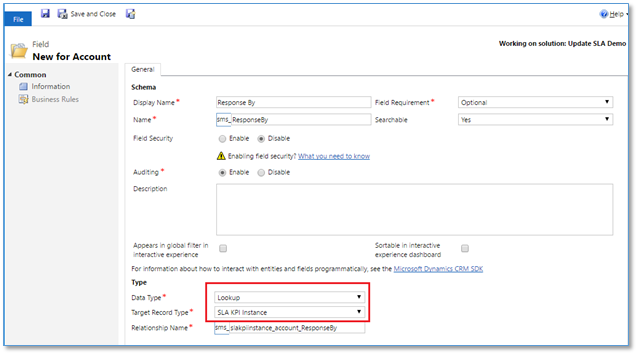
Define KPI field for the entity. Only Case entity has a defined KPI.
- Data Type: Lookup
- Target Record Type: SLA KPI Instance
-
Create your SLA for Account.
-
Go to Settings -> Service Management -> Service Level Agreement

-
Click New. Modal dialog is displayed.
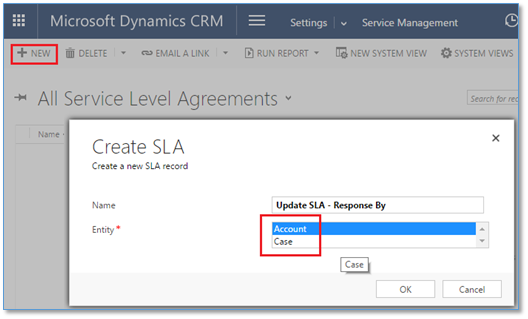
- Select Account
-
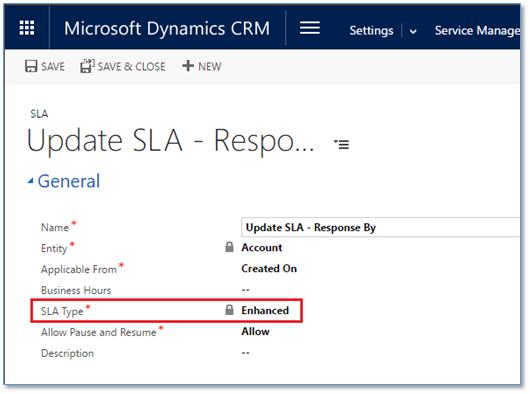
Click Ok. SLA form is displayed.
-
Notice that SLA Type is “lock” with “Enhanced”.
This applies to all entities and only the case entity has an option to have either Standard or Enhanced SLA type.
-
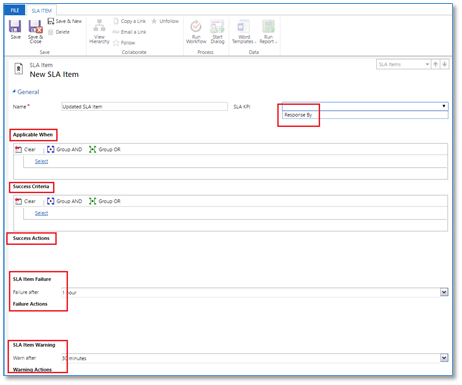
Click Save. SLA Item form is displayed.
-
Check the SLA KPI, this is the field we created at step 3.
- Maximum of 5 KPI Instance field per entity.
- Set Applicable When conditions
- Set the Success Criteria
- Success Actions
- SLA Item Failure action
-
SLA Item Warning action
-
What are the limitations?
- Max of 7 entities with 7 enabled SLA.
- Max of KPI fields per entity is 5.
Conclusions
This new feature has been requested by some of my peers to provide KPI features to custom entities. Seems like they are heard.
It just opens up a broad possibilities of features/capabilities when delivering/designing a project particularly to the business users.
When using this feature, just be aware of the limitations mentioned that should be taken to consideration during the design phase.
 Power Platform Iter
Leave a comment