
In this blog, we will discuss 1) the types of Dynamics CRM Online instance and 2) what are the reasons why you will need to change from one instance type to another and vice-versa.
Currently, there two types of instance in Dynamics CRM – Production, and Sandbox.
By default, when a user signed-up for Dynamics CRM, the default instance type is Production.
Sandbox instance (also known as non-production instance) is an instance isolated from a Production instances. This is the safe place to develop and test applications.
Below are the features only available in Sandbox instance and possibly the reason why, at one-point you will have to switch to Sandbox instance.
-
Enable Administration Mode – if this is enabled, only System Administrators and System Customizers “can” access your Microsoft Dynamics CRM Online instance.
This is one of your option (the easiest) to “temporarily” limit the access to your CRM instance.
- Restore a backup – One of the new feature introduced in Microsoft Dynamics CRM Online 2016 Update 1 is the daily system backup. Administrators can rollback to those backups at will. However, restoration is only available via Sandbox instance.
- Delete – to delete an instance.
- Reset – is just a shortcut for delete and installation of new instance.
Switching to an instance
Below is the procedure how to switch to a different instance type. We will switch from Production to Sandbox. The same procedure applies from Sandbox to Production.
- Login as O365 Administrator
- Navigate to CRM Online Administrator page
- Select the instance
-
Click
Edit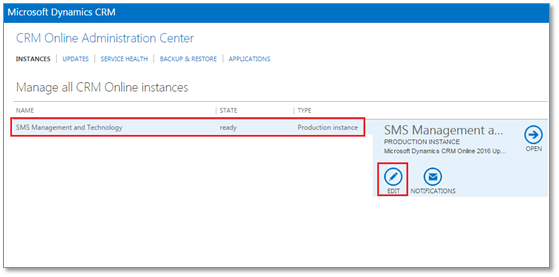
-
In Instance Type, select Sandbox
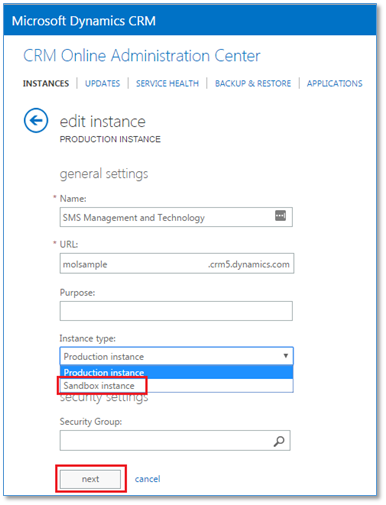
- Click
Next -
Click
Save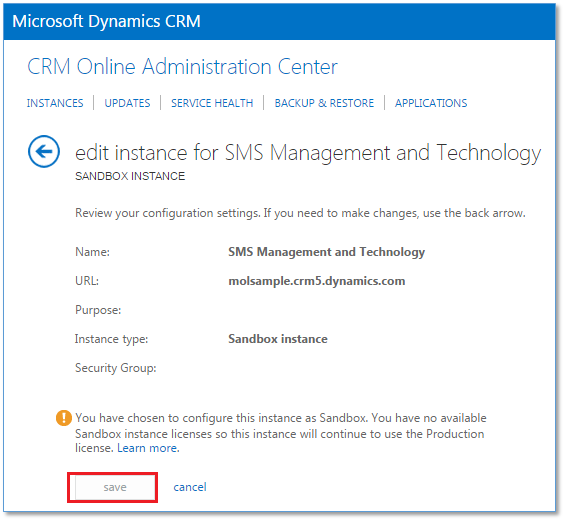
-
After this, Sandbox feature will now be available.

How to get a Sandbox?
Clients with 25 or more Professional or Enterprise licenses, they are provided with 1 free sandbox instance.
O365 administrators can purchase 1 or more Sandbox instances for $150 USD per sandbox instance per month.
Here is the link for prices of other licenses.
Conclusion
With the latest feature “Restore and Backup” of Microsoft Dynamics CRM Online 2016 Update 1, switching to Sandbox instance will become a significant part of a deployment process, particularly in the rollback procedure.
Therefore, knowing the Sandbox features above and the Restore-and-Backup feature is vital today to manage Microsoft Dynamics CRM Online.
Keywords
Microsoft Dynamics CRM instance types, Microsoft Dynamics CRM Sandbox instance, Microsoft Dynamics CRM Sandbox features, Microsoft Dynamics CRM Sandbox.
 Power Platform Iter
Leave a comment