
LinkedIn Sales Navigator release an update. We were informed that because of this release, the current version that is installed in our client will stop working on a certain date.
Therefore, we are forced to upgrade the current package installed in the system.
Issue
We are upgrading the LinkedIn Sales Navigator for our client using Installation Guide.
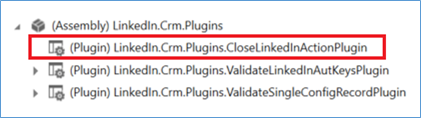
However, we cannot complete the upgrade because of the error related “LinkedIn.Crm.Plugins.CloseLinkedInActionPlugin”.

Solution
To resolve this issue, you need to “Unregister” the LinkedIn.Crm.Plugins.CloseLinkedInActionPlugin.
To do this, fire-up Plugin Registration tool.
Navigate to the LinkedIn plugins.
Select LinkedIn.Crm.Plugins.CloseLinkedInActionPlugin
Click Unregister.

In our case, it took some time before the plugin was unregistered.
Once completed, perform the import of the LinkedIn solution again.
Keywords:
LinkedIn Sales Navigator Upgrade, LinkedIn Sales Navigator Upgrade Error Sales Navigator 2016, Dynamics CRM,
 Power Platform Iter
Leave a comment