

“Sonoma Partners is a Dynamics CRM DevTool extension to Google Chrome which provides a variety of tools to help optimize customizing and troubleshooting within Dynamics CRM”
This is one of my favorite tool and I’ll tell you why.
- Handy – This is an extension to Google Chrome. Meaning, I can easily download and use this specially when I’m working with a client or other developers.
-
Feature rich – For developers, “Show Schema” feature can really help because it will display the schema names of the fields in the forms which is being used in the code (JavaScripts or plugins).
Also, you can also [a] create and [b] execute FetchXml code.
How to get?
Open Google Chrome and access this link.
How to open?
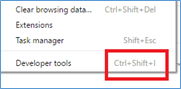
Option 1 (Short-cut): Press Ctrl + Shift + I
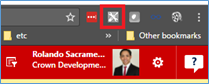
Option 2: In the browser, there is icon of CRM DevTool.
Just click it and a pop-up select will be displayed.
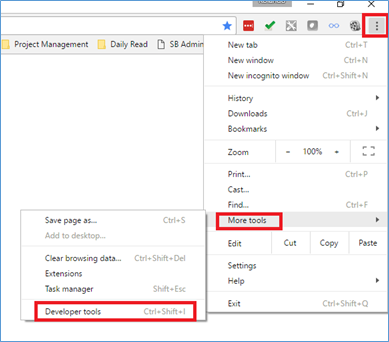
Option 3: In the browser, click Ellipses -> More tools -> Developer tools;
Below is a detailed list and description of its features (excerpt from Chrome Webstore)
A variety of developer tools for Dynamics 365, CRM 2011-2016
Now supporting Dynamics 365!
Dynamics CRM DevTools is an extension to Google Chrome which provides a variety of tools to help optimize customizing and troubleshooting within Dynamics CRM. Currently all deployments of CRM 2015, CRM 2015 Update 1, CRM 2013 and CRM 2011 UR 12+ are supported. A full list of features are listed below.
Form Information
– Displays the current form’s back-end information
– Entity Name
– Entity Id
– Entity Type Code
– Form Type
– Dirty Fields
– Ability to show the current form’s attributes’ schema names
– Ability to refresh the current form
– Ability to enable disabled attributes on the current form (System Administrators only)
– Ability to show hidden attributes on the current form (System Administrators only)
– Ability to copy the current record URL
– Ability to open the Performance Center to help troubleshoot performance issues with the form
– Bring back the record properties dialog that existed in CRM 2011
Current User Information
– Domain Name
– User Id
– Business Unit Id
– User Roles
Find
– Ability to open advanced find
– Set focus to a field on the current form
– Display a specific User and navigate to the record (by Id)
– Display a specific Privilege (by Id)
– Display an Entity Type Code from an Entity Name
– Ability to display and navigate to the current user record
– Ability to navigate to any record by providing the entity name and id
Test
– Ability to update attributes from the current form (System Administrators only)
– This is helpful when you need to update values for testing but the fields don’t exist on the form
Fetch
– Execute any Fetch XML statement and view the results
– Fetch XML highlighting, auto-completion of nodes and intellisense
Plugins
– Displays all registered plugin assemblies and their details
– Entity
– Filtering Attributes
– Stage
– Displays number of successes, crashes and failures for any sandbox plugin (sandbox only)
Debug
– New tab replaces the DB & Server tab
– Ability to open the diagnostics page to test latency and bandwidth
– Ability to open the Default Solution
– Ability to open the Debug Information page which displays version information for all the parts of the CRM environment
– Ability to open the CRM For Tablets app which can be used for debugging in the browse
 Power Platform Iter
Leave a comment