
Role-Based Access Control (RBAC) is an access management strategy of Azure. The principle for RBAC is to assign the “least” privilege that will let the user, application, or groups to perform their jobs based on their roles.
There are two main thing topics when discussing RBAC:
- Role – it is the ability/privilege.
- Scope – it defines the level on where the role is applied.
Role
Below are just the top three roles in Azure.
- Owner – it can do all that it wants to an object.
- Reader – it is only allowed to read/access but it cannot modify the object.
- Contributor – it is similar to Owner but it cannot give access to other users/applications.
Scope
Azure has 4 resource levels. The below is the list of scope and its hierarchy.
- Management (top).
- Subscription
- Resource Group
- Resource
When a scope is defined, it has Parent-Child effect. If you applied a role, at a subscription level (scope), it will be applied to all the resource groups and resources under the subscription.
Both Role & Scope will define the least privilege for users or applications.
The least privilege setup possible is a Reader at a Resource level.
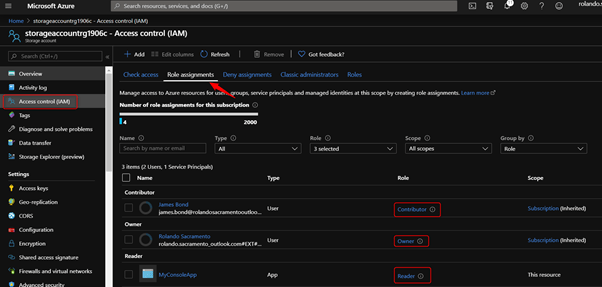
The example below shows that:
- There are 3 users that can access the storageaccount.
- Each user has different role, a contributor, Owner, and Reader.
- Notice that Contributor and Owner’s scope is a Subscription
- Notice also that MyConsoleApp has a Reader privilege at resource level.
 Power Platform Iter
Leave a comment