One of our clients recently asked a simple question: “We have these two apps in Outlook and Teams, Sales and Dynamics 365, but we don’t know the difference. Which one should our sellers use?”
It is a fair question. Both apps connect Microsoft 365 to Dynamics 365 Sales, both open as a side pane next to your email, and both show your CRM records. But they were built for different jobs. Instead of a quick reply, here is the more detailed answer we gave them.
The short answer
The Dynamics 365 app is a window into your CRM. Sales agent is an AI assistant that works on top of it.
The Dynamics 365 App for Outlook is the long-standing add-in for tracking emails and appointments and linking them to the right account, contact or opportunity. You click, you choose the record, you track.
Sales agent (formerly Viva Sales, then Copilot for Sales) is Microsoft’s AI assistant for sellers. It brings CRM insights from Dynamics 365 Sales or Salesforce into Outlook and Teams: email summaries, reply drafts, meeting insights and next-step suggestions. Microsoft made it generally available in July 2026.
They are not competitors. Most teams that use Sales agent still need Dynamics 365 Sales underneath it, and many keep both apps.
Side-by-side comparison
| Dynamics 365 app (App for Outlook) | Sales agent (the “Sales” app) | |
|---|---|---|
| What it is | A CRM add-in that opens Dynamics 365 records inside Outlook | An AI assistant for sellers, part of Microsoft 365 Copilot |
| Main job | Track and link emails and appointments to CRM records | Summarize, draft, suggest next steps and surface deal insights |
| How you work with it | Manual: you click Track or Set Regarding and pick the record | Conversational: you ask in plain language or use suggested prompts |
| Button or app name | Dynamics 365 | Sales |
| Where it runs | Outlook desktop, web, Mac and mobile | Outlook, Teams (chats and meetings), Copilot chat, and inside Dynamics 365 Sales apps; also on Outlook and Teams mobile |
| Generative AI | None in the add-in itself | Email summaries, reply drafts, opportunity summaries, meeting insights and next steps |
| Create or update records | Yes, quick create and edit of Dynamics 365 records | Yes, view, create and edit CRM records from the pane |
| CRMs supported | Dynamics 365 customer engagement apps (Sales, Customer Service and others) | Dynamics 365 Sales and Salesforce |
| Who sets it up | Dynamics 365 or Power Platform admin; needs server-side sync | Microsoft 365 admin installs; users need the Salesperson or Sales Manager role |
| Licensing | Comes with your Dynamics 365 app license | Limited features come with Sales Enterprise, Sales Premium and Relationship Sales; the full experience needs Microsoft 365 Copilot (or the Copilot for Sales add-on) |
| Microsoft’s direction | Mature and stable | Where new features are landing |
Licensing changes often. Confirm your entitlements in the Microsoft Product Terms or with your partner before you roll out.
How to tell them apart on screen
Both apps open from the Apps panel in Outlook, and each has its own icon. Look for the name at the top of the pane: Dynamics 365 is the CRM add-in, Sales is Sales agent. Here is the same email opened in each.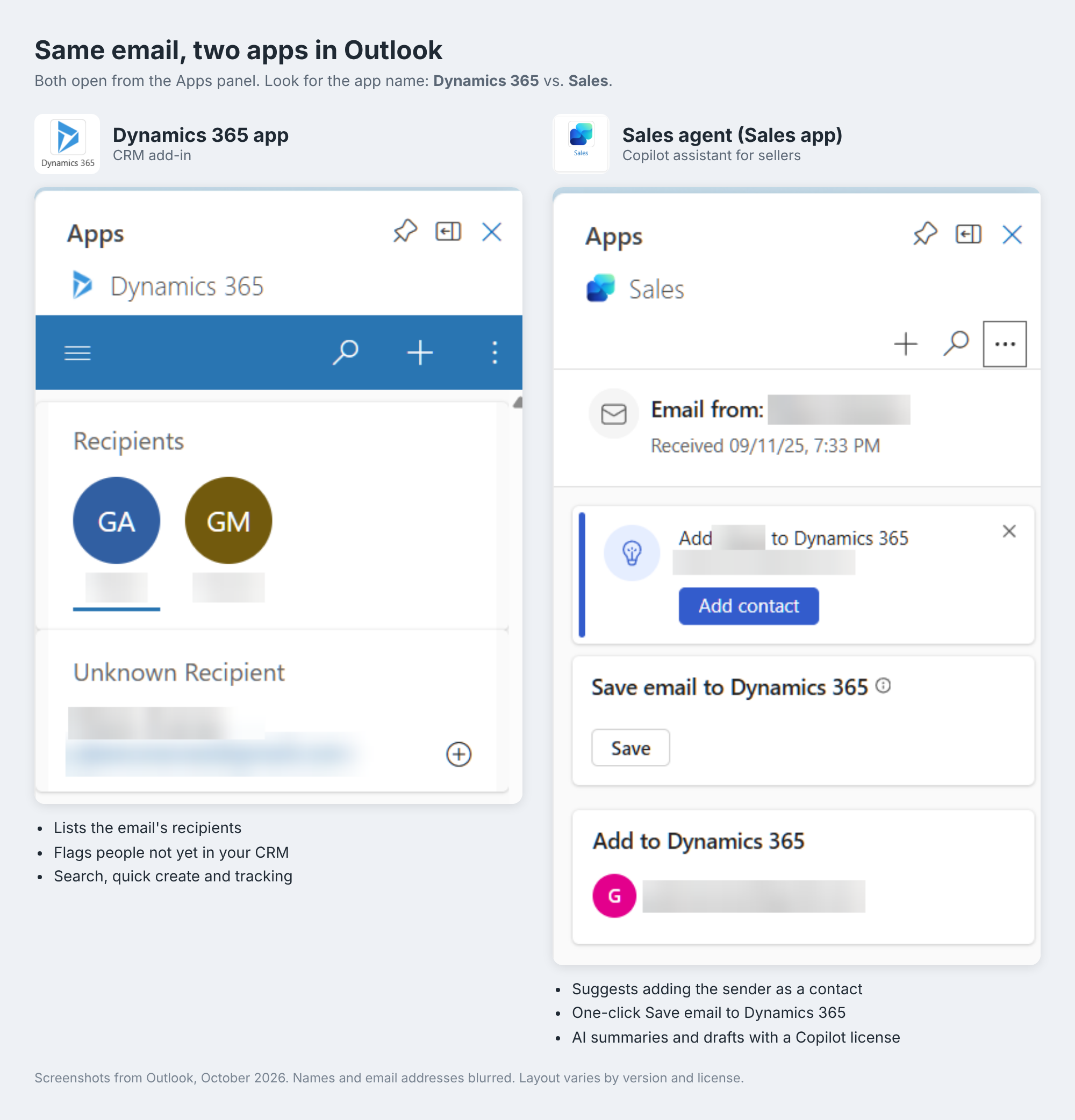
The Dynamics 365 pane shows who is on the email and flags anyone who isn’t in your CRM yet. You then search, create or track records yourself.
The Sales pane goes a step further. It suggests adding the sender as a contact and gives you a one-click Save for the email. With a Microsoft 365 Copilot license, the same pane also summarizes the thread, drafts replies and suggests next steps.
Which one should your team use?
For most Dynamics 365 Sales customers, the answer is both, each for its own job.
- Keep the Dynamics 365 app if your sellers need reliable, rule-based tracking of every email and appointment, you run Dynamics 365 on-premises, or you use other customer engagement apps such as Customer Service.
- Turn on Sales agent if your sellers live in Outlook and Teams and you want to cut admin time: catching up on long threads, prepping for meetings, drafting follow-ups and updating opportunities without opening the CRM.
- Fix the data first. Sales agent answers from your CRM. Stale opportunities and missing contacts produce weak summaries, so clean data matters more than ever.
- Check licenses before you promise features. Sales Enterprise users get a limited set of Sales agent features. The full experience depends on Microsoft 365 Copilot.
The bottom line for our client: the Dynamics 365 app records what happened; Sales agent helps sellers understand it and decide what to do next.
Sources
- Welcome to Sales agent, Microsoft Learn
- Sales Agent is now generally available, Microsoft Tech Community
- Copilot for Sales features for Dynamics 365 Sales users, Microsoft Learn
- Dynamics 365 Sales pricing, Microsoft
- Use Dynamics 365 App for Outlook, Microsoft Learn
- Microsoft Sales Agent in Outlook and Teams, CRM Software Blog


Leave a Reply